The Text Cleaner and Auto-Typer is a specialized utility for Windows designed to solve a common frustration: restricted form fields that block "Ctrl+V" (Paste) operations.
Why use an Auto-Typer?
Many legacy banking sites, remote desktop environments, and secure forms disable the paste function, forcing users to manually type long strings of data. This tool bypasses those restrictions by simulating keystrokes at the operating system level. It takes your text, cleans up unwanted formatting, and "types" it into the active window as if you were using your keyboard.
Advanced Formatting Cleaning
Beyond just typing, this tool acts as a clipboard sanitizer. It automatically strips:
Use Cases
C:\TECH>list
PythonPyAutoGUITkinter
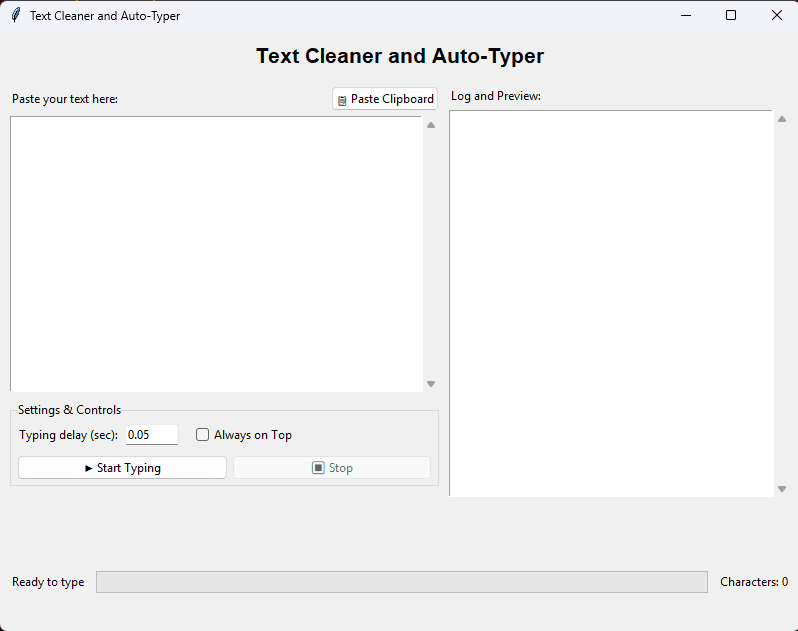
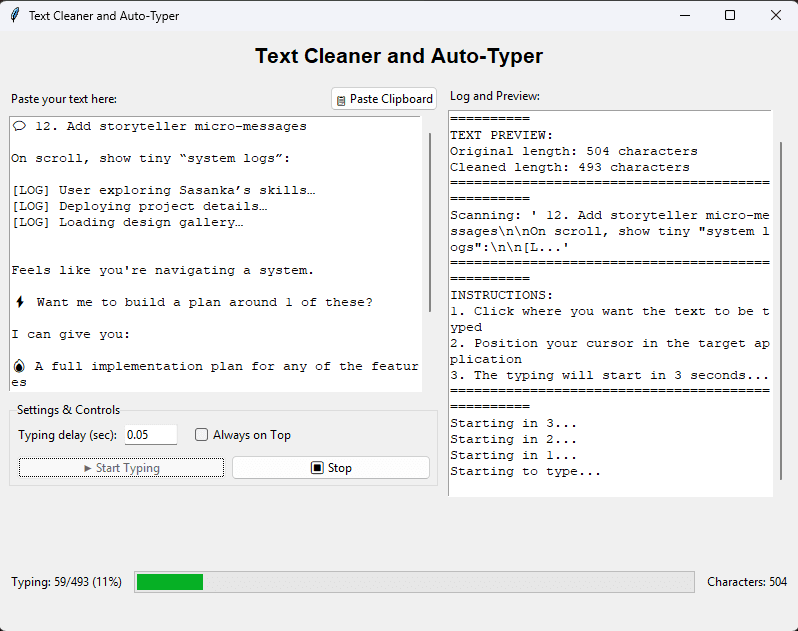
- [01]Text Cleaning: Automatically cleans formatted text
- [02]Clipboard Integration: One-click paste from system clipboard
- [03]Adjustable Speed with configurable delay
- [04]Progress Tracking & Real-time char count
- [05]Always on Top floating window
- [06]Safe: Quick "Stop" button
Q:How does the Auto-Typer work?
It uses the PyAutoGUI library to simulate physical keyboard presses. The computer sees the input as coming from your hardware keyboard, allowing it to work in any application.
Q:Is this a keylogger?
No. This is a one-way outgoing tool. It reads from your clipboard only when you tell it to and outputs text. It does not record or store your keystrokes.
Q:Can I control the typing speed?
Yes, the tool includes an adjustable delay setting. You can slow it down for older, laggy applications or speed it up for instant entry.
Q:Does it work on Windows 11?
Yes, it is fully compatible with Windows 10 and Windows 11.