← BACK TO TOOLS

🤖WhatsApp Auto Sender Bot

SYSTEM_OVERVIEW

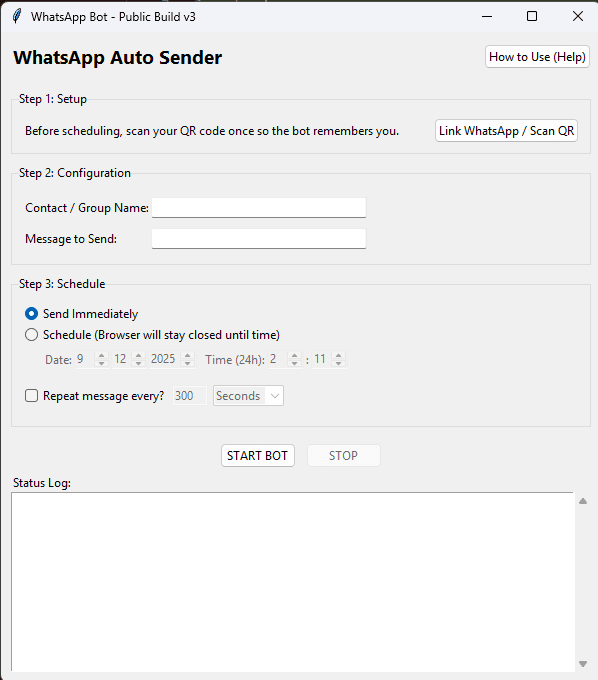
The WhatsApp Auto Sender Bot is a powerful desktop automation tool designed to streamline your messaging workflows. Built with Python and Selenium, it allows individuals and businesses to schedule and send WhatsApp messages automatically without manual intervention.


Who is this for?

This tool is perfect for:

  • Small Business Owners: Send order updates, invoices, or promotional offers to customers.
  • Marketers: Manage broadcast lists and engagement campaigns effectively.
  • Community Managers: Keep your groups and contacts informed with scheduled announcements.
  • Data Entry Professionals: Automate repetitive messaging tasks.

  • Key Capabilities

    Unlike standard broadcasting lists, this bot simulates a real user interaction using a dedicated Chrome instance. This ensures higher delivery rates and allows you to send messages to numbers that haven't saved your contact details. The "Just-In-Time" browser system manages system resources efficiently by only running the browser when a message needs to be sent.


    *Disclaimer: This tool is intended for personal productivity and legitimate business communication. Please use responsibly and adhere to WhatsApp's terms of service.*

    TECH_STACK
    C:\TECH>list
    PythonSeleniumTkinter
    CORE_FEATURES
    • [01]GUI Interface: Simple graphical interface
    • [02]Smart Scheduling: Just-In-Time browser system
    • [03]Resource Friendly: Closes browser between actions
    • [04]Persistent Login: Remembers sessions
    • [05]Isolated Environment: Separate Chrome instance
    FAQ_DATABASE
    Q:Is this bot safe to use?
    Yes, the bot operates by simulating natural human interactions through a real browser instance, making it safer than API-based unauthorized tools.
    Q:Do I need to save contacts to send messages?
    No, one of the key features is the ability to send messages to any phone number without needing to add them to your contacts first.
    Q:Can I schedule messages for later?
    Absolutely. The tool includes a smart scheduling system that lets you queue messages for specific dates and times.
    Q:Does it run in the background?
    The application runs as a desktop app. It manages a separate Chrome window that opens and closes automatically based on your schedule to save RAM.